Most audit leaders can tell you why they should automate testing of procure-to-pay (P2P) transactions, the full cycle from raising a purchase order to paying the invoice. None of them can tell you what actually happens in week one.
That gap is the real barrier. Ask a Chief Audit Executive about moving from sample-based testing to checking every single P2P transaction, and you'll get a confident answer on the "why." Ask what happens between making that decision and seeing the first real results, and the answer gets vague fast. A vendor demo, maybe a trial next quarter. No clear steps, no owner, no timeline.
That vagueness, not the technology itself, is what stalls these programs. Teams that treat P2P audit automation as buying a new software tool tend to get stuck comparing vendors for months. Teams that treat it as a change in how audit testing works, with technology simply supporting that change, get from decision to first results in under a month. This guide walks through that second, faster path.
What is P2P audit automation?
P2P audit automation means checking every procure-to-pay transaction against a set of risk checks, such as duplicate payments, unauthorized approvals, and fake vendors, instead of manually reviewing a small random sample. An automated system does the checking continuously, so nothing has to wait for the next audit cycle.
Why P2P Is the Right Place to Start
Procure-to-pay isn't the simplest area to automate. It's the one with the most to gain.
It's usually the highest-volume area in any audit plan, so the gap between what gets checked and what should get checked is widest here. It's also unusually well-defined: a purchase request, a purchase order, a delivery, an invoice, and a payment happen in a set order, with a clear checkpoint at each step. That clear structure is what makes it possible to automate. Everyone already agrees on what "normal" looks like, so it's easier to agree on what counts as unusual.
P2P also already produces a lot of useful data. Every transaction leaves a full record in the company's finance or ERP system (the software that runs core business processes like purchasing and payments). That information has been sitting there for years. The real problem was never a lack of data. It was that traditional audit testing only ever looked at a small slice of it.
High risk, high volume, and a clear process. That combination is why P2P is usually the best place to start, not the last place teams get to.
It also fits with where audit standards have been heading for a while. Focusing audit effort where risk is highest, rather than spreading a fixed number of hours evenly across everything, is a long-standing idea in the profession, one that the Institute of Internal Auditors (IIA) has consistently supported through its professional standards. Automating P2P testing doesn't go against that idea. It's actually a more complete way of following it: instead of guessing where the risk is based on 5 to 10 percent of transactions, the audit team can look at all of them and let the data show where the real risk sits.
The 8 P2P Checks Worth Automating First
Not every check benefits equally from automation. These eight are the ones where checking everything catches problems that a sample simply can't.
- Duplicate payments. A sample only catches a duplicate payment if it happens to be one of the transactions selected for review. Checking every transaction catches all duplicates, including ones where the vendor name, amount, or invoice number was changed slightly to slip through.
- Fake or fictitious vendors. Manual review usually checks vendor records once, at a single point in time. An automated check compares every vendor record against employee records, tax ID formats, and addresses, on every transaction, not just the small number picked for review.
- Splitting one purchase into several smaller ones. Breaking a large purchase into several smaller purchase orders to avoid needing extra approval is a pattern that shows up across several transactions, not in any single one. A sample rarely catches this because it looks at transactions one at a time. Automated checks can track a vendor or requester's behavior over time.
- Approvals that skip the rules. Payments approved by someone without the right authority, or by someone who shouldn't have any say over that vendor, follow a clear yes-or-no rule. This is one of the easiest things to automate, and one of the most commonly missed by hand, simply because manual reviewers only see a fraction of transactions.
- Employees secretly tied to vendors. Comparing employee details, home address, bank account, phone number, against vendor details across the entire vendor list isn't something a manual sample can realistically do. It only works if every record is checked, which is exactly what automation is good at.
- Mismatches between deliveries and invoices. Differences between what was delivered and what was billed, in quantity, price, or timing, come up often in P2P and are usually under-checked because comparing them by hand takes time. An automated system runs that comparison on every transaction, every time.
- Suspiciously round payment amounts. A vendor that unusually often bills in round numbers is a known warning sign. It's a pattern across many transactions, which makes it nearly invisible to a sample and easy for automated analysis to spot.
- Vendors that suddenly reactivate. A vendor that goes quiet for a year and then starts billing again is worth a closer look. Manual testing rarely catches this because checking for inactivity usually isn't part of the standard review. An automated system can flag this as a standing rule rather than something someone has to remember to check.
The pattern across all eight is the same: sampling misses things that follow a pattern across many transactions rather than showing up in any single one. Automation exists to close exactly that gap.
What Data You Need Before You Start
Four types of data need to be identified and made accessible before any automation project can move forward.
- Payment and invoice records. The complete list of payments and invoices, not a summary or a shortened version.
- Vendor records. Including past changes, not just what the vendor record looks like today.
- Purchase order records. Purchase requests, purchase orders, and any approval history tied to them.
- Approval records. Who approved each transaction, at what level of authority, and when.
This information usually lives in the company's ERP system (SAP, Oracle, Microsoft Dynamics, or similar), and sometimes in a separate purchasing system that needs to be connected to the ERP data.
Here's the part most teams worry about more than they need to: the data is never perfectly clean, and it doesn't have to be. Vendor names will be spelled differently in different places. Some older records will have gaps. Different systems will label the same field differently. None of that stops automation from working. What actually matters is that the basic details, transaction amount, vendor ID, date, and who approved it, are there and consistent enough to match up across systems. Waiting to clean up the data perfectly before starting is usually just a way of putting off the start.
How to Roll This Out: From Getting Access to Your First Real Report
In Netscribes' proof-of-concept projects, the teams that move fastest generally follow a pattern like this.
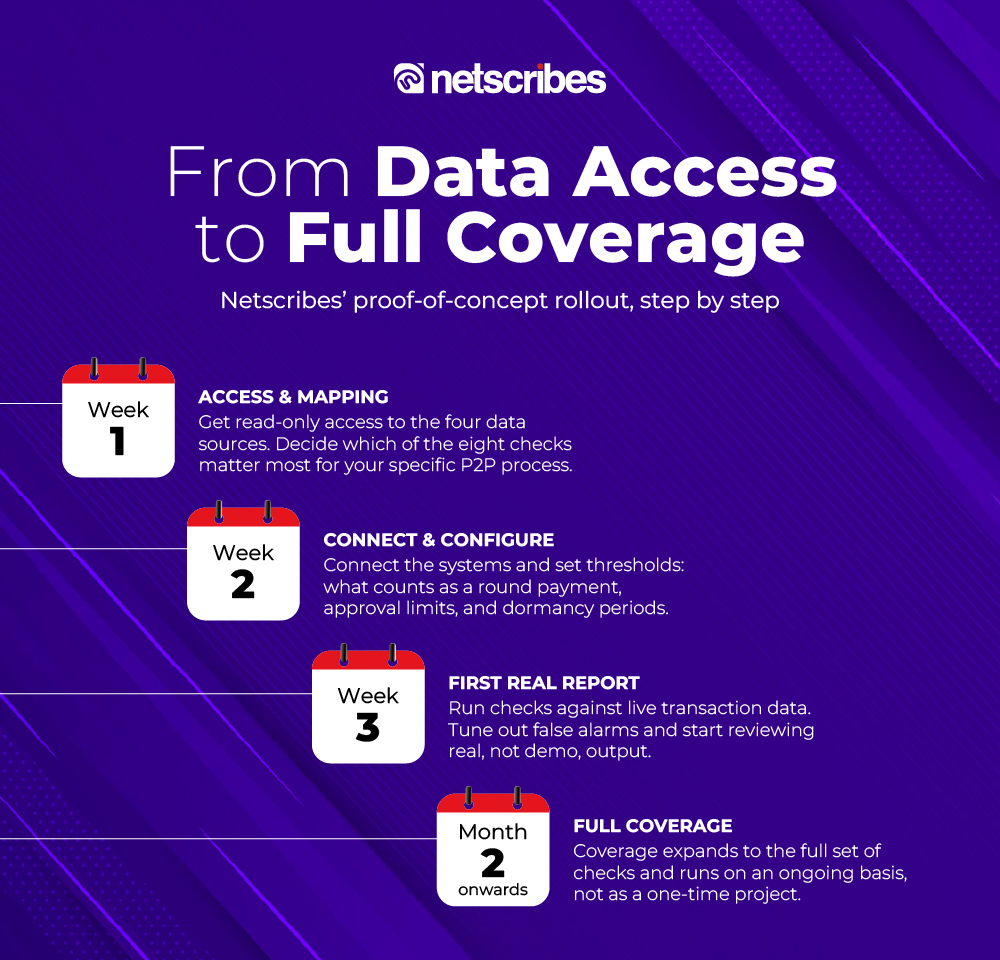
Week 1: Get access to the data and map out the checks.
Get read-only access to the four data sources above. Decide which of the eight checks apply to this organization's specific P2P process and approval setup, since not every check will matter equally everywhere.
Week 2: Connect the systems and set up the checks.
Connect the different data sources and set the rules for each check that matters most. This is where specific thresholds get decided: what counts as a "round" payment amount, what approval limits apply, how long a vendor has to be inactive before it counts as dormant.
Weeks 3-4: Produce the first real report.
Run the checks against live transaction data and produce the first real results. This is also when the team removes false alarms and starts reviewing genuine, real-world output instead of a demo.
Month 2 onward: Full ongoing coverage.
Once the initial checks are working well, coverage expands to the full set of checks and runs on an ongoing basis rather than as a one-time project.
This is the pattern behind NS's 2-4 week proof-of-concept approach, and the short timeline is intentional. Getting to a real first report within four weeks is possible specifically because the process starts with data access and setting up the checks, not with buying new infrastructure.
What Changes for the Audit Team
Automation changes how the work gets done before it changes the results, and that's worth planning for honestly.
In Netscribes’ proof-of-concept projects, audit teams have reported spending somewhere around 80 percent of their testing time on preparation: pulling samples, formatting spreadsheets, reconciling different systems, before any actual review even starts. Automated, continuous checking removes most of that. What's left is reviewing the flagged items: understanding why something was flagged, digging into the cause, and deciding what needs escalating.
That shift means auditors spend more time using judgment and less time on manual data work. The audit team's core job doesn't change: forming a professional view on whether controls are working. What changes is the group of transactions that judgment gets applied to, all of them, instead of a 5 to 10 percent slice.
There's also a skill shift worth planning for early. Auditors who've mostly done data extraction and reconciliation need to get comfortable sorting through flagged items, telling a real problem apart from a data quirk or a one-off timing issue. That's a different skill than picking a sample, and it's usually built fastest by having the team work through the first few weeks of real flagged items together, rather than being handed a finished tool and a training manual. Teams that adopt this fastest treat the first real report as a working session, not a finished product to sign off on.
Getting Started
P2P audit automation isn't really about installing a new system. It's about changing how the audit team spends its time, with an automated process handling the manual work that sampling always had to work around.
Organizations that get this right don't start with a six-month vendor comparison. They start with one process, one clear set of data, and a short trial that produces a real, usable report before the quarter is out.
This is exactly where Netscribes comes in. Rather than selling a platform and leaving the setup to your team, NS runs the first four weeks alongside you: mapping which of the eight checks matter most for your P2P process, connecting to your existing systems without a lengthy IT project, and configuring the checks based on how your organization actually approves and pays vendors. By the end of the trial, your team isn't looking at a demo. They're looking at a real report built from your own transaction data, with NS's audit and data specialists on hand to walk through what it found and what to do next.
Book a 30-minute P2P audit automation scoping call to work out which of the eight checks apply to your P2P process, and what a 2-4 week trial would look like with your data.
FAQs
1. What is a P2P audit and why does it matter?
A procure-to-pay (P2P) audit is a structured review of the full procurement lifecycle, from purchase requisition through to supplier payment, assessing whether transactions comply with internal controls, authorization policies, and financial accuracy. P2P is the starting point for most audit automation programs because it combines the highest transaction volume, the highest risk concentration (duplicate payments, fictitious vendors, unauthorized spend), and the most structured control points in any organization's financial operations.
2. How long does it take to implement P2P audit automation?
A well-scoped implementation can deliver a live exception report in 2–4 weeks. Week 1 covers data access and control mapping; Week 2 builds the transaction pipeline and rule configuration; Weeks 3–4 run the first live exception sweep. Full continuous coverage, where 100% of transactions are monitored in real time, typically follows in Month 2. The timeline depends heavily on data readiness and ERP access, not on technology complexity.
3. What are the biggest risks in the procure-to-pay process?
The five highest-risk control points in P2P are: duplicate invoice payments (same vendor, same amount, different invoice number), fictitious or dormant vendor reactivations, split purchase orders designed to avoid authorization thresholds, employee-vendor conflicts of interest, and goods receipt/invoice discrepancies where payment is made before confirmation of delivery.
4. What data do you need to automate P2P audit controls?
The minimum viable dataset for P2P automation is: the AP transaction file (invoice number, vendor ID, amount, date, payment status), the vendor master file (bank details, addresses, registration data), purchase order data (approver, PO amount, line items), and approval workflow logs. Most organizations have all of this in their ERP, the challenge is extraction quality and join integrity across tables, not data availability.
5. What's the difference between continuous audit monitoring and a P2P audit?
A P2P audit is a periodic, sampled review of procure-to-pay transactions, typically covering 5–15% of transactions for a defined period. Continuous audit monitoring applies automated controls across 100% of transactions in real time, flagging exceptions as they occur rather than discovering them weeks or months later. The difference is coverage, timing, and the ratio of auditor time spent on data preparation versus actual analysis.